From Mesh to Print‑Ready
in One Click

Mesh2Print is a standalone desktop app that repairs your 3D models and exports clean .3MF files straight to your slicer. Drag in any format - STL, OBJ, FBX, Blender, Maya, and more. No waiting for Blender or Maya to load - Mesh2Print opens in seconds.

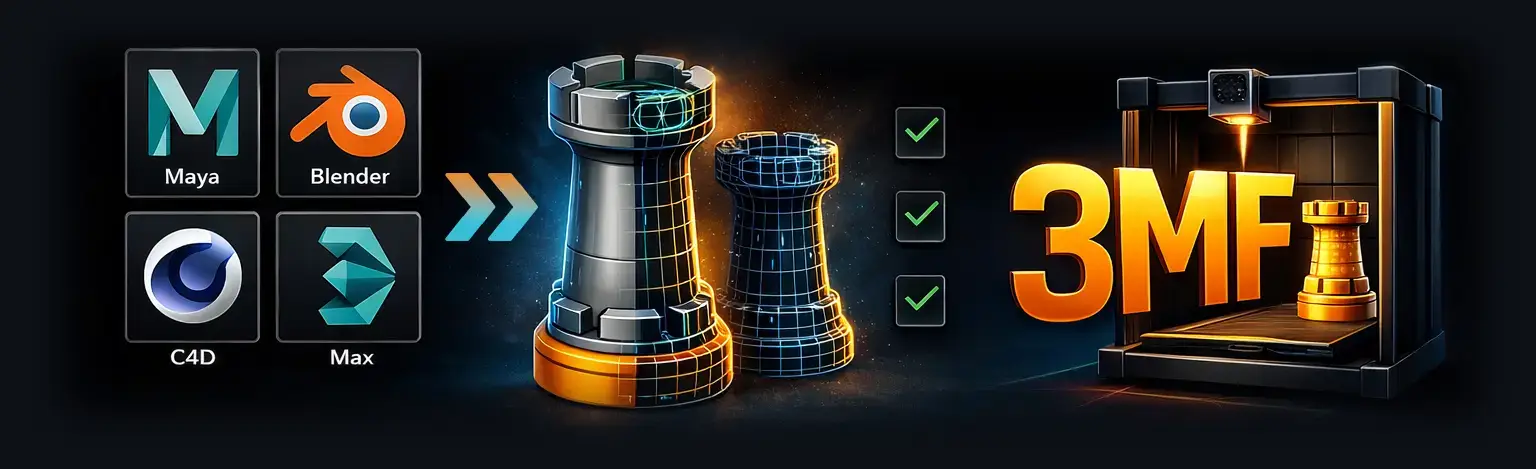
From your 3D software through Mesh2Print checks to your 3D printer
⬇ Download Mesh2Print See Mesh Repair Features

$39.99  ·  14-day free trial  ·  Windows & macOS  ·  v1.0.0  ·  From Inferno VFX, Inc.

Mesh2Print
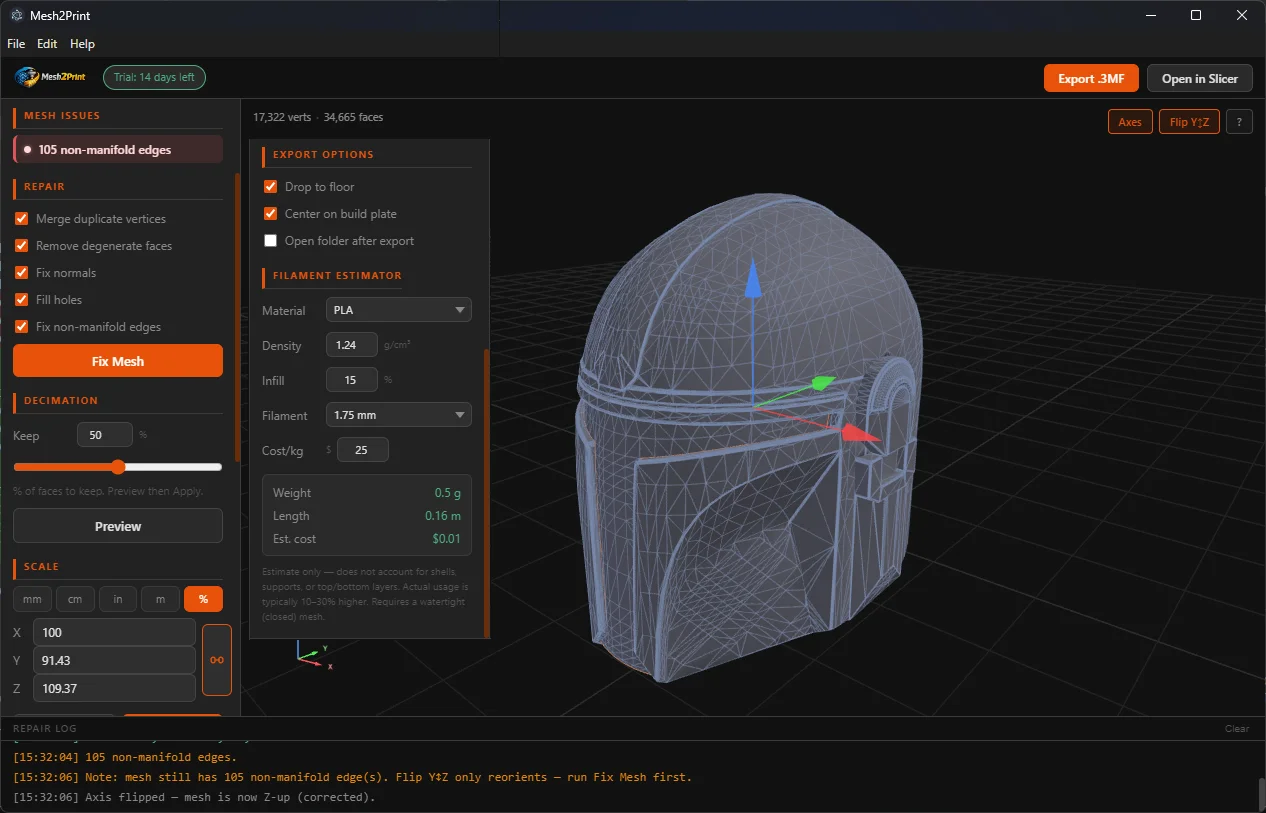
Mesh2Print app screenshot - 3D mesh repair and export interface

Mesh2Print v1.0.0 - Windows & macOS


Imports from all major 3D software - Windows & macOS

Autodesk Maya Autodesk Maya .mb / .ma  ·  Maya must be installed
Blender Blender .blend  ·  Blender must be installed
3DS Max 3DS Max .max  ·  3DS Max must be installed
Cinema 4D Cinema 4D .c4d  ·  Cinema 4D must be installed

Two things your slicer can't do for you

Slicers are great at slicing -but they won't repair your mesh or reduce its complexity before they try. Mesh2Print handles both, so your slicer gets a clean, lightweight file every time.

Export

Clean .3MF - the format slicers actually want

.3MF is the modern replacement for STL. It carries units, orientation, and multi-part assembly data -so what you see in Mesh2Print is exactly what lands in your slicer. No more mystery-scaled or upside-down models.

  • Correct units baked in -no surprises in Bambu Studio or PrusaSlicer
  • Drop to floor + centre on build plate in one click
  • Y-up → Z-up axis correction (Maya, Cinema 4D, GLTF)
  • Auto-open your slicer after export -12 slicers detected
  • Binary STL also available for legacy workflows
Decimation

Tame million-poly sculpts in seconds

High-resolution sculpts and scanned meshes often have far more polygons than a printer can ever use. Mesh2Print uses Quadric Error Metrics (QEM) to reduce face count while preserving surface shape -no needle triangles, no visual degradation at sensible ratios.

  • QEM algorithm -far better results than edge-collapse or vertex clustering
  • Preview before committing -compare full vs decimated side by side
  • Set target as % of original -type 25% to quarter the face count
  • Slicers process faster, exports are smaller, prints are identical
  • Run Fix Mesh after to clean up any edges introduced by decimation

Intelligent Mesh Repair

Most 3D models aren't print-ready straight out of your 3D software. Mesh2Print diagnoses and fixes the most common issues automatically - before a single slice is computed.

Non-Manifold Detection

Scans every edge in your mesh. Reports boundary edges (open holes) and non-manifold edges (shared by 3+ faces) before export - so you know exactly what needs fixing.

Weld Duplicate Vertices

Merges vertices within a configurable tolerance (default 0.1 µm). Eliminates invisible seams and T-junctions that cause slicer artefacts and incorrect wall thickness calculations.

Remove Degenerate Faces

Strips out zero-area triangles - collapsed faces or duplicated vertices that cause slicer errors and incorrect volume calculations.

Fix Normals

Uses BFS flood-fill to make triangle winding consistent across the whole mesh, then applies an outward-facing majority vote. Fixes inverted faces that print as voids or cause slicer confusion.

Fill Holes - Make Watertight

Detects open boundary edge loops and fills them using fan triangulation from the loop centroid. Works well for flat and near-flat holes like missing caps and open ends.

Repair Log

Every repair action is listed in a live log -merged vertices, removed faces, filled holes -so you always know exactly what was changed and why. Log text is selectable and copyable.


Clean Export, Every Time

All the options you need to get a print-ready .3MF out of any 3D software.

Auto Unit Conversion

Reads your scene units (mm, cm, m, inches, feet) and converts to millimetres as required by the 3MF spec. No surprises in your slicer.

Y-up → Z-up Axis Fix

Maya and Cinema 4D are Y-up; Bambu Studio, PrusaSlicer and Cura expect Z-up. One checkbox reorients your model automatically.

Build Plate Alignment

Drop to floor (Z = 0) and centre on the build plate in one click - no manual repositioning inside your slicer.

Scale & Resize

Set exact dimensions in mm, cm, inches, or metres -or switch to % mode and type 200 to double the size. Proportional chain lock keeps all axes in sync automatically.

Open Folder on Export

Automatically opens the output folder in Finder or Explorer - drag the .3MF straight into your slicer.

Launches in Seconds

No waiting for a full DCC suite to boot. Mesh2Print opens instantly - fix a model, export it, and get back to printing without sitting through Maya or Blender startup screens.

Estimated Print Volume

Calculates mesh volume in mm³ and cm³ using the divergence theorem - displayed live in the repair log per object and as a total. Great for material estimates before you slice.

Mesh Decimation (QEM)

Reduce face count to any percentage using Quadric Error Metrics -the gold standard for shape-preserving decimation. Preview before committing. Great for dense sculpts or scanned meshes that are overkill for printing.

Auto-Open in Slicer

After export, automatically open your .3MF or .STL directly in Bambu Studio, PrusaSlicer, or UltiMaker Cura - detected automatically on your machine. No manual drag-and-drop needed.

STL Export

Need legacy format support? Export binary STL alongside 3MF - compatible with every slicer and 3D printer workflow ever made. All mesh repair runs the same regardless of output format.

Filament Cost Estimator

Enter your filament type, infill percentage, and cost per kilogram. Mesh2Print calculates estimated weight, length, and print cost -live, from the mesh volume. Estimates update instantly when you scale the model. Supports PLA, PETG, ABS, TPU, ASA, Nylon, Resin, and custom densities.

Download, drop in a file, done.

Mesh2Print is a standalone desktop app -no plugins, no DCC software required to get started. Drop in any 3D file and it just works.

  • 1Download and install Mesh2Print for Windows or macOS. No Python, no dependencies -just double-click and go.
  • 2Drag any 3D file into the window - STL, OBJ, FBX, PLY, 3MF, GLB, or native files from Blender, Maya, 3DS Max, and Cinema 4D.
  • 3Inspect the 3D viewer, run mesh repair, check your filament estimate, and export a clean .3MF or .STL.
  • 4Click Open in Slicer - Mesh2Print detects Bambu Studio, PrusaSlicer, Cura and more automatically.
⬇ Download Mesh2Print
Mesh2Print v1.0.0
──────────────────────────────
Loaded: 48,320 verts, 96,640 faces
! 12 non-manifold edges
──────────────────────────────
Running standard repair…
Merged 1,204 duplicate vertices
Filled 1 hole (4 edges)
Normals unified
──────────────────────────────
✓ Mesh is clean -ready to print.

Simple pricing.

One purchase, all features, forever. Try it free for 14 days -no credit card required.

Mesh2Print
$39.99
One-time purchase  ·  Windows & macOS

⬇ Download -14-Day Free Trial

Common Questions

Everything else you might want to know.

Why .3MF instead of .STL?

.3MF is the modern successor to STL. It supports units, orientation, multi-part assemblies and is the preferred format for Bambu Studio and PrusaSlicer.

How good is the hole filling?

It handles flat and near-flat holes very well (missing caps, open ends). Complex curved or twisted holes may need manual repair - Mesh2Print will still detect and report them even if it can't fill them perfectly.

Which slicers support .3MF?

All major slicers: Bambu Studio, PrusaSlicer, Cura, Simplify3D, Chitubox, Lychee Slicer, and more. Mesh2Print can also auto-detect and open your slicer directly after export.

When should I use STL instead of 3MF?

STL is supported by every slicer ever made and is fine for simple single-material prints. Use 3MF when you need units, multi-part assemblies, or per-object colors. Both formats go through the same full mesh repair pipeline.

How does the volume estimate work?

Mesh2Print uses the divergence theorem to compute the signed volume of each mesh after repair. It's displayed per-object and as a combined total in the repair log - useful for estimating filament usage before slicing.

What versions are supported?

Maya 2022-2025+, Blender 3.0-4.x, 3DS Max 2022-2026+, Cinema 4D 2023+. Older versions may work but are untested.

Do I need Python or any other software installed?

No - Mesh2Print is a standalone desktop app. Just download and run it. No Python, no dependencies. If you want to import native Maya, Blender, 3DS Max, or Cinema 4D files, those applications must be installed on your machine, as Mesh2Print calls them in the background to export the geometry. Standard formats like STL, OBJ, FBX, and 3MF work with no extra software at all.

Does 3DS Max work on Mac?

No - Autodesk discontinued 3DS Max for macOS years ago. The Max plugin is Windows-only. Maya, Blender and Cinema 4D work on both platforms.


Also from your friends at Inferno VFX!

Drive Browser

Drive Browser

Instantly search all your unplugged external drives, discs & tapes - without connecting them. Drive Browser indexes your storage media so you can browse folders, find files, and preview images and videos even when the drive is sitting on a shelf. Powered by AI image search.

  • Search disconnected hard drives, USBs, DVDs & LTO tapes instantly
  • AI-powered image search - describe what you're looking for
  • Thumbnail gallery, file type filtering, 100% local - no cloud uploads
  • Windows 10+ & macOS 10.14+
Learn More at drivebrowser.com →

Mesh2Print

Download Mesh2Print v1.0.0

A 14-day free trial is included -no credit card required. Purchase a license key at any time from within the app.

🪟   Download for Windows 🍎   Download for macOS

v1.0.0  ·  Windows 10+  ·  macOS 12+  ·  No Python required  ·  More software from InfernoVFX →